In this blog post, you will get the query to “Split data into N equal groups” using SQL Server and you will also see the practical implementation of the following important topics of SQL Server. Happy learning !
1) Ranking Functions (ROW_NUMBER() and NTILE())
2) Local scoped temporary/hash table
3) CTE (Common Table Expression)
4) STUFF() Function
5) NULLIF() Function
Create a table and load it with some rows by executing the below query.
[code language=”sql”]
CREATE TABLE tbl_Split_Test
(
Value VARCHAR(50)
)
INSERT INTO tbl_Split_Test (Value) VALUES (‘A’), (‘B’), (‘C’), (‘D’), (‘E’), (‘F’), (‘G’), (‘H’)
[/code]
Create the stored procedure by executing the below query.
[code language=”sql”]
CREATE PROCEDURE usp_Split_data_into_N_equal_groups
(
@No_Of_Rows_In_Group TINYINT
)
AS
BEGIN
SET NOCOUNT ON
DECLARE @Partition TINYINT
SELECT ROW_NUMBER() OVER(ORDER BY Value ASC) AS RowID
,
CASE (ROW_NUMBER() OVER(ORDER BY Value ASC) % NULLIF(@No_Of_Rows_In_Group, 0))
WHEN 0 THEN @No_Of_Rows_In_Group
ELSE (ROW_NUMBER() OVER(ORDER BY Value ASC) % NULLIF(@No_Of_Rows_In_Group, 0))
END AS GroupID
, Value
INTO #Value_stag
FROM tbl_Split_Test
SELECT @Partition = COUNT(1)
FROM #Value_stag
WHERE GroupID = 1
; WITH cte_groups_stag
AS
(
SELECT RowID
, NTILE(ISNULL(@Partition, 1)) OVER(PARTITION BY GroupID ORDER BY RowID ASC) AS GroupID
, Value
FROM #Value_stag
)
, cte_unique_groups_stag
AS
(
SELECT DISTINCT GroupID
FROM cte_groups_stag
)
SELECT GroupID
, Value = STUFF(
(
SELECT ‘,’ + Value
FROM cte_groups_stag STG1
WHERE STG1.GroupID = STG2.GroupID
FOR XML PATH(”)
), 1, 1, ”)
FROM cte_unique_groups_stag STG2
IF OBJECT_ID(‘tempdb..#Value_stag’) IS NOT NULL DROP TABLE #Value_stag
END
[/code]
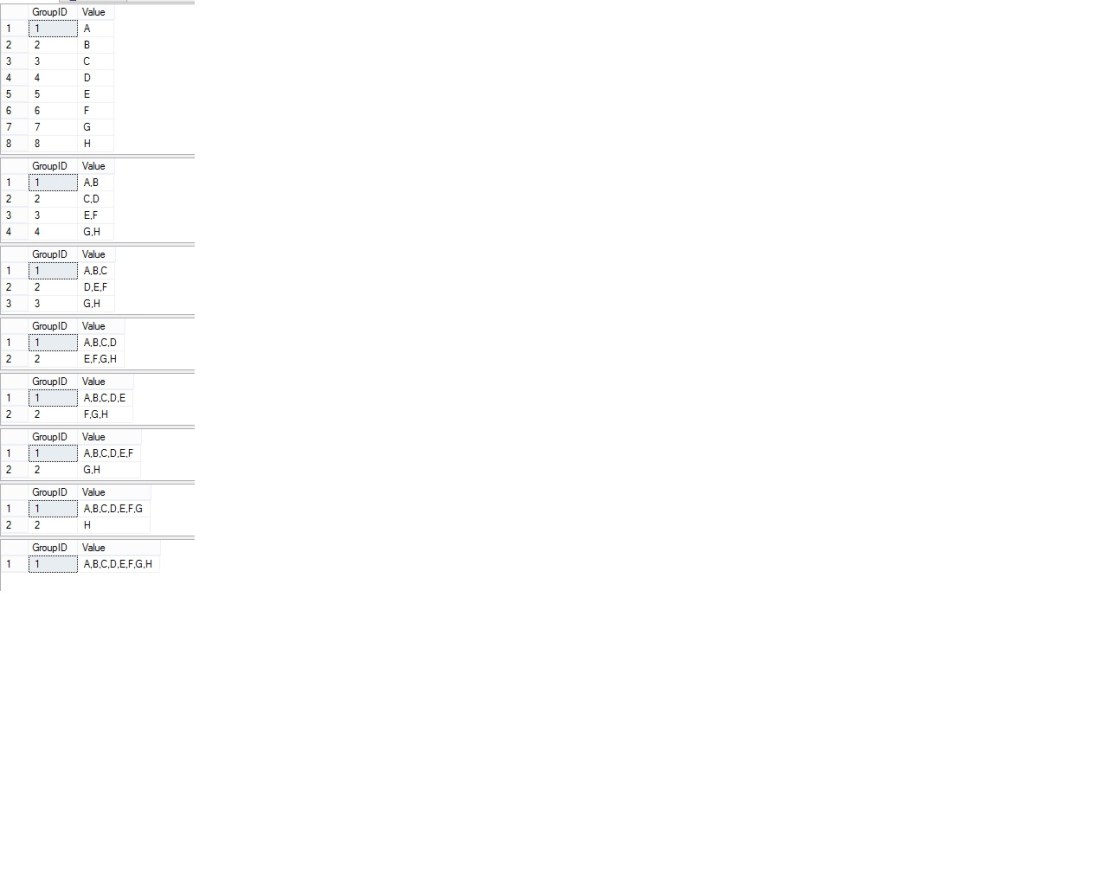
Now execute the below queries to check the output.
[code language=”sql”]
EXEC usp_Split_data_into_N_equal_groups
@No_Of_Rows_In_Group = 1
EXEC usp_Split_data_into_N_equal_groups
@No_Of_Rows_In_Group = 2
EXEC usp_Split_data_into_N_equal_groups
@No_Of_Rows_In_Group = 3
EXEC usp_Split_data_into_N_equal_groups
@No_Of_Rows_In_Group = 4
EXEC usp_Split_data_into_N_equal_groups
@No_Of_Rows_In_Group = 5
EXEC usp_Split_data_into_N_equal_groups
@No_Of_Rows_In_Group = 6
EXEC usp_Split_data_into_N_equal_groups
@No_Of_Rows_In_Group = 7
EXEC usp_Split_data_into_N_equal_groups
@No_Of_Rows_In_Group = 8
[/code]
Have a look at the output.
Conclusion :
I have used single column table and concatenation just for illustration. That’s not the sole purpose of this. The core logic of grouping the dataset in the dynamic equal groups can be used for the variety of purposes.